2013-04-09_zip
因為最近想要研究有關App的功能,所以想要建立一個虛擬機來進行測試,以下為相關的ISO產生方式.
1.下載Mac OS X Mountain Lion InstallESD.dmg,這部分請到Google找吧
2.使用7-Zip解開剛剛下載的檔案,會有一個InstallMacOSX.pkg,再向下找會有一個InstallESD.dmg

brucebin 發表在 痞客邦 留言(0) 人氣()

1
有一台很久未登入的設備忘記登入密碼了,紀錄一下相關步驟方便日後處理
1.開進時進入GRUB開機選單時,上下鍵隨便動一下,可以停在登入的選項.
 
2.按 ’ e ’ 可以看到有三個選項,選擇kernel那個選項後,再按 ’ e ’來編輯開機選單.

brucebin 發表在 痞客邦 留言(0) 人氣()

最近遇到要將vmdk轉換成vhd的事情,這邊紀錄以下相關文件方便日後查詢StarWind V2V Image Converter我有成功移轉過一次但是另一位同仁測試是不行的,要再多測試幾種程式了
 
資料來源:http://www.ithome.com.tw/itadm/article.php?c=63460&s=1

brucebin 發表在 痞客邦 留言(0) 人氣()

rootcmd
在啟動Windows 8 時發現到一些跟Windows 7 不一樣的地方,因為操作介面全改了所以紀錄一下避免下次忘掉
1.程式取得管理者權限的方法:
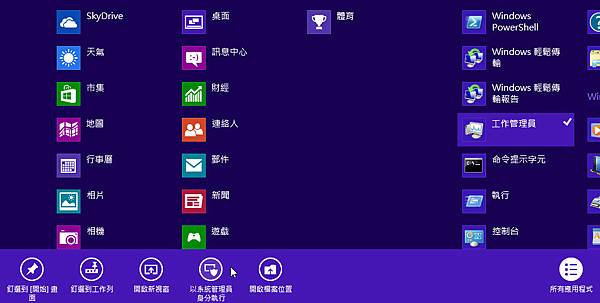
    在 Windows 8 中的動態磚畫面中,選取要使用的程式按右鍵,下方就會有"以系統管理員身分執行"的選項出現了.
   

brucebin 發表在 痞客邦 留言(0) 人氣()

最近安裝完Windows 8 Enterprise之後,發現無法啟動!
Windows 8的安裝過程輸入註冊碼的畫面,而進入Windows 8 Enterprise又無法更改註冊碼,所以就會出現無法註冊的問題, 所以我們需要利用別的方式來註冊,以下為相關步驟及參考連結作??
請利用「系統管理員」的權限開啟「命令提示字元」
並且需在網路連線正常的情況下
然後依序輸入以下指令:
slmgr.vbs /ipk 自己的序號
slmgr.vbs /ato
即可正常啟用
以下微軟相關連結:
http://support.microsoft.com/kb/929826/zh-tw
http://technet.microsoft.com/zh-tw/library/ff793433.aspx

brucebin 發表在 痞客邦 留言(0) 人氣()

在 VMware Workstation 灌了好幾次的 Centos ,灌完開機後網卡只會顯示lo網卡.
但是查詢 cat /etc/sysconfig/network-scripts/ifcfg-eth0 可以看到網路相關設定.
修改 vi /etc/sysconfig/network-scripts/ifcfg-eth0
修改 ONBOOT="yes"
重新啟動後網卡會自動帶起來了

brucebin 發表在 痞客邦 留言(0) 人氣()

來源資料:http://blogger.liaohaha.tw/2012/03/ubuntu-1110-cpu.html
先安裝lm-sensors
sudo apt-get install lm-sensors
然後執行sensors即可
demo@u11.10:~$ sensors
atk0110-acpi-0
Adapter: ACPI interface
Vcore Voltage:      +1.39 V  (min =  +0.85 V, max =  +1.60 V)
 +3.3 Voltage:      +3.38 V  (min =  +2.97 V, max =  +3.63 V)
 +5 Voltage:        +5.07 V  (min =  +4.50 V, max =  +5.50 V)
 +12 Voltage:      +12.25 V  (min = +10.20 V, max = +13.80 V)
CPU FAN Speed:     1418 RPM  (min =    0 RPM)
CHASSIS FAN Speed:    0 RPM  (min =  800 RPM)
CPU Temperature:    +46.0°C  (high = +60.0°C, crit = +95.0°C)
MB Temperature:     +54.0°C  (high = +45.0°C, crit = +95.0°C)
可以先用sensors-detect去偵測到所有的sensor並寫入設定檔,下次開機會自動載入相關的modules。

brucebin 發表在 痞客邦 留言(0) 人氣()

fopen 開啟檔案或URL
完整說明:http://php.net/manual/zh/function.fopen.php


模式


名稱


功用


r


Read


開啟檔案,以供讀取,從檔案開頭開始


r+


Read


開啟檔案,以供讀取及寫入,從檔案開頭開始


w


Write


開啟檔案,並寫入(覆寫)


w+


Write


開啟檔案,以供讀取及寫入(覆寫)


x


Cautious write


開啟檔案並寫入,假如檔案已存在,不會開啟開檔,fopen()會回傳false


x+


Cautious write


開啟檔案,供讀取及寫入,假如檔案已存在,不會開啟開檔,fopen()會回傳false


a


Append


開啟檔案,以供新增內容,接續在目前已有的內容之後開始寫入,假如檔案不存在,會建立一個新檔


a+


Append


開啟檔案,以供新增及讀取內容,接續在目前已有的內容之後開始寫入,假如檔案不存在,會建立一個新檔


brucebin 發表在 痞客邦 留言(0) 人氣()

2009929135417272

為了要測試DataCore SANsymphony的功能,所以裝在VM上進行測試.VM我只有裝一台,第二台用Copy vmdk的方式產生.所以SID and Server Name 會一樣,需要執行 Sysprep 來處理.
執行 c:\windows\system32\sysprep\sysprep.exe
執行後畫面如下:
 
此時,系統清理動作選擇「進入系統全新體驗(OOBE)」
關機選項則依照個人意願即可,記得…要勾核一般化,如此一來按下確定隨即完成sysprep

brucebin 發表在 痞客邦 留言(0) 人氣()


使用 ESXi 5.0 update1 安裝 Windows 2012 RC ,在最後一步完成安裝後就會卡在轉圈圈的那個黑色畫面再也不會動了.
google發現到要修改一個參數即可,步驟如下:
1.將卡住的 VM 關掉.
2.修改VM的 vmx 檔案,在最下面加上 vmGenCounter.enable = "FALSE"
3.重新啟動 VM 

brucebin 發表在 痞客邦 留言(0) 人氣()

最近裝了不少的FreeBSD的各種版本,有發現到一個方便更新ports的工具先記錄下來,不想每一次都來找了
資料來源: http://www.cyberciti.biz/tips/howto-keep-freebsd-system-upto-date.html
 
Updating FreeBSD server system is quite easy. You can apply security patch to keep freebsd system up to date.
Required tools aka software
You need to have following tools on system
(a) portmanager - FreeBSD ultimate ports update utility.
(b) portsnap - It is a system for securely distributing the FreeBSD ports tree. Approximately once an hour, a snapshot of the ports tree is generated, repackaged, and cryptographically signed. The resulting files are then distributed via HTTP.
(c) pkg_version - List the installed version of the package is older than the current version.
FreeBSD install portsnap (for older system version <6.0)
On FreeBSD 6.0+, portsnap is contained in the FreeBSD base (core) system. You only need to to install portsanp as follows for older FreeBSD system:
# cd /usr/ports/ports-mgmt/portsnap
# make install clean
FreeBSD install portmanager
# cd /usr/ports/ports-mgmt/portmanager
# make install clean
Upgrade FreeBSD ports collection
Run portsnap as follows:
# portsnap fetch extract
OR
# portsnap fetch
# portsnap extract
Update FreeBSD packages / software
Now run portmanager to upgrade installed ports:
# portmanager -u
It will updates ports in the correct order based on their dependencies. If a port fails to "make" during update it is marked as ignored. Portmanager will continue updating any ports not marked as "ignored" so long as they are not dependent on the ignored port. Also note that it may take some time if you have large number of application installed.
If you need to upgrade all installed ports with logging, enter:
# portmanager -u -l
How do I upgrade a single software only?
portmanager allows you to update a single port and all of its dependencies. For example update port called bash i.e. bash shell (shells/bash), enter:
# portmanager shells/bash -l -u -f

brucebin 發表在 痞客邦 留言(0) 人氣()

1. 程式下載及安裝:
    A. ASP.Net Framework 1.1 版可轉散發套件(會出現相容性警告視窗)
    B. ASP.NET Framework 1.1 版繁體中文語言套件
    C. ASP.NET Framework 1.1 SP1(會出現相容性警告視窗)
    D. ASP.NET Framework 1.1 Service Pack 1 CLR 安全性更新(會出現相容性警告視窗)
2. 設定 ISAPI 及 CGI 限制:
   打開 ii7, 點選 iis 伺服器, 在功能檢視中, 找到 "ISAPI 及 CGI 限制".
   進入之後, 按右鍵新增, 設定路徑為: C:\Windows\Microsoft.NET\Framework\v1.1.4322\aspnet_isapi.dll,
   描述可以打上: ASP.NET v1.1.4322, 勾選 "允許延伸路徑執行", 按下確定.  
3. 在IIS中註冊ASP.NET 1.1:
   在 C:\Windows\Microsoft.net\Framework\v1.1.4322\aspnet_regiis -ir -enable

brucebin 發表在 痞客邦 留言(0) 人氣()

1 2 3 4 5
Blog Stats
⚠️

成人內容提醒

本部落格內容僅限年滿十八歲者瀏覽。
若您未滿十八歲,請立即離開。

已滿十八歲者,亦請勿將內容提供給未成年人士。